Phase 19 — 3D Product Surfaces Shipped; Peak P&D 80/80 Not Earned
STATUS: CLAIM_NOT_EARNED. Peak P&D 3D Detection / QA@20 ≥80% was not earned. MK artefact apps/web/data/phase19/ is absent. Percents stay null — not 0%. Peak P remains partial / FLOOR_IDENTITY_AMBIGUOUS / 0 floors / persisted false. Corpus badge INSUFFICIENT_CROSS_PROJECT_COVERAGE. Phase 20 S33 SUCCESS_MODEL_PASS (countRows = 11, lengthMetresSum = 0) is a separate offline training win, not this gate. No 80–90% claim. No IFC. Assumed storey height is labelled assumed, never measured.
This is an investigation journal plus a product how-to. Every figure below is copied from product code on main, the Phase 18 reconstruct / qty artefacts, the Phase 20 success report, and the Phase 19 stub (docs/PEAK_PHASE19_ACCURACY_REPORT.md). Nothing was re-scored for publication. There is no MK CLAIM_PASS file. Blocked work stays blocked.
What Phase 19 asked
Phase 18 shipped PDF → in-app world_metres_v1 → Schedule C mapping, then stopped: Peak P is partial, floor identity is ambiguous, and every 3D Detection / QA@20 percent is blocked (null). That path post is /blog/phase18-pdf-to-in-app-3d. Phase 19 set a different product question: unblock floor identity, let a user opt in to generate 3D on upload (default off), give the project a /3d home, and evaluate Peak P&D until 3D Detection and QA@20 each reach at least 80% — or print CLAIM_NOT_EARNED.
The estimand is qty_3d (methodVersion phase19_qty_3d_v1). It is not Phase 5–17 2D QA@20. The two scores must not be blended. Opt-in research flags (EVIDENCE_TILED_EXTRACT, VECTOR_GEOMETRY_COUNT) stay off in the signed-in default extract; they are not this 3D path either.
Verdict: CLAIM_NOT_EARNED
The earned-claim gate required a quantity-blind MK artefact with Peak live project 143a3a07-99c1-46b4-809c-716365a673b8, P drawing 198b4105-324b-4ded-8cf8-a267248b19c4, sheet P&D, both Detection and QA@20 ≥80% with n/N, and claimStatus CLAIM_PASS. That file does not exist. apps/web/data/phase19/ is absent. Phase 20 left peak80Optional.claimStatus: not_evaluated with both percents null. Because the 80/80 gate was never satisfied, this post echoes CLAIM_NOT_EARNED — not CLAIM_PASS, and not a fabricated 0%.
| Gate | Result | n/N | Note |
|---|---|---|---|
| Peak P&D 3D Detection ≥80% | CLAIM_NOT_EARNED | null / null | MK artefact absent. Phase 18 leftover: blocked, percent null. |
| Peak P&D 3D QA@20 ≥80% | CLAIM_NOT_EARNED | null / null | Same. Inventory 139 drawable rows is not an evaluated denominator. |
| Corpus 80–90% | not claimed | 0 evaluated / 21 | INSUFFICIENT_CROSS_PROJECT_COVERAGE. Peak-only would still need CLAIM_PASS first. |
What did ship (and what did not)
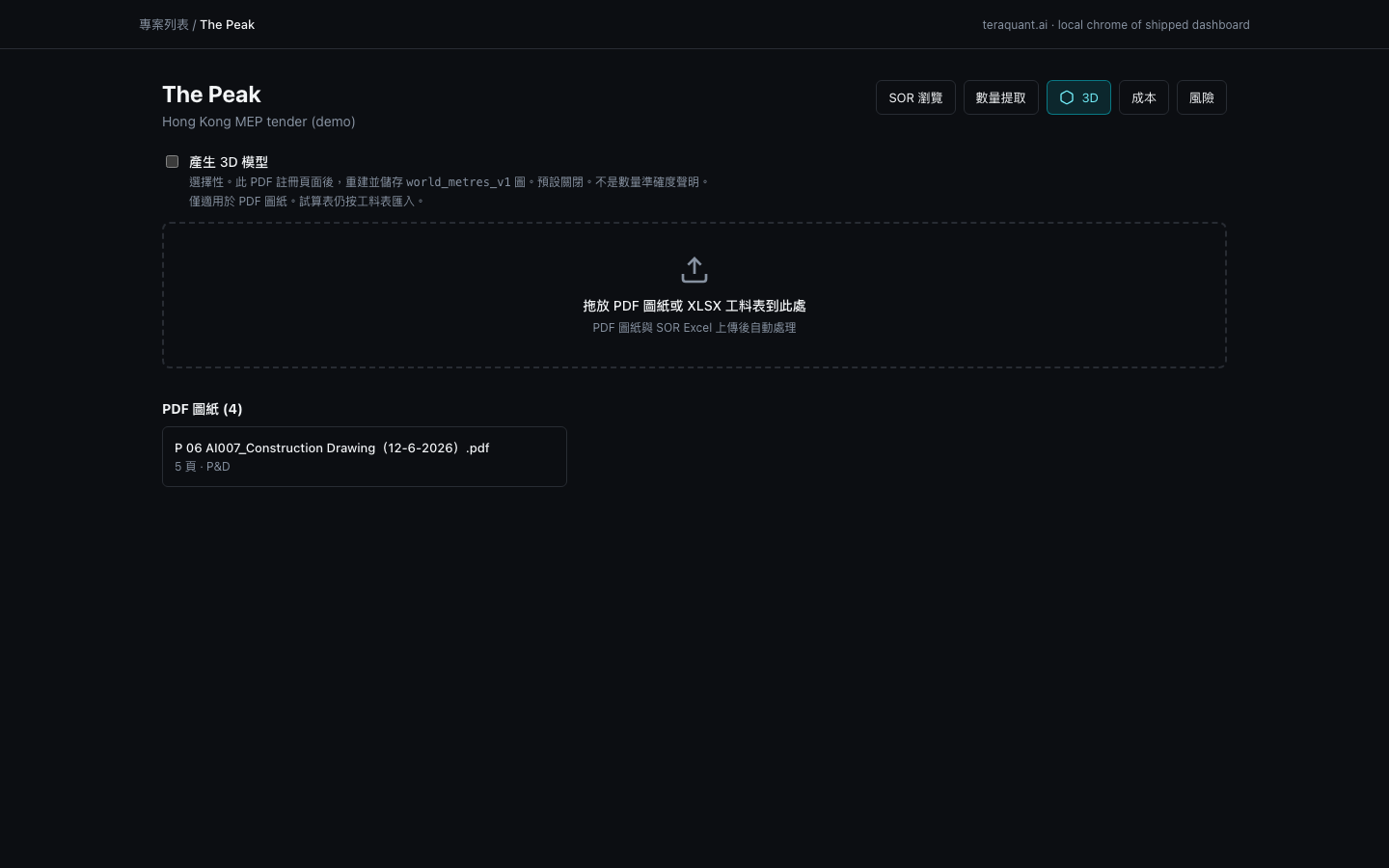
- Upload checkbox Generate 3D model / 產生 3D 模型 — default unchecked. PDF only. Not an accuracy claim.
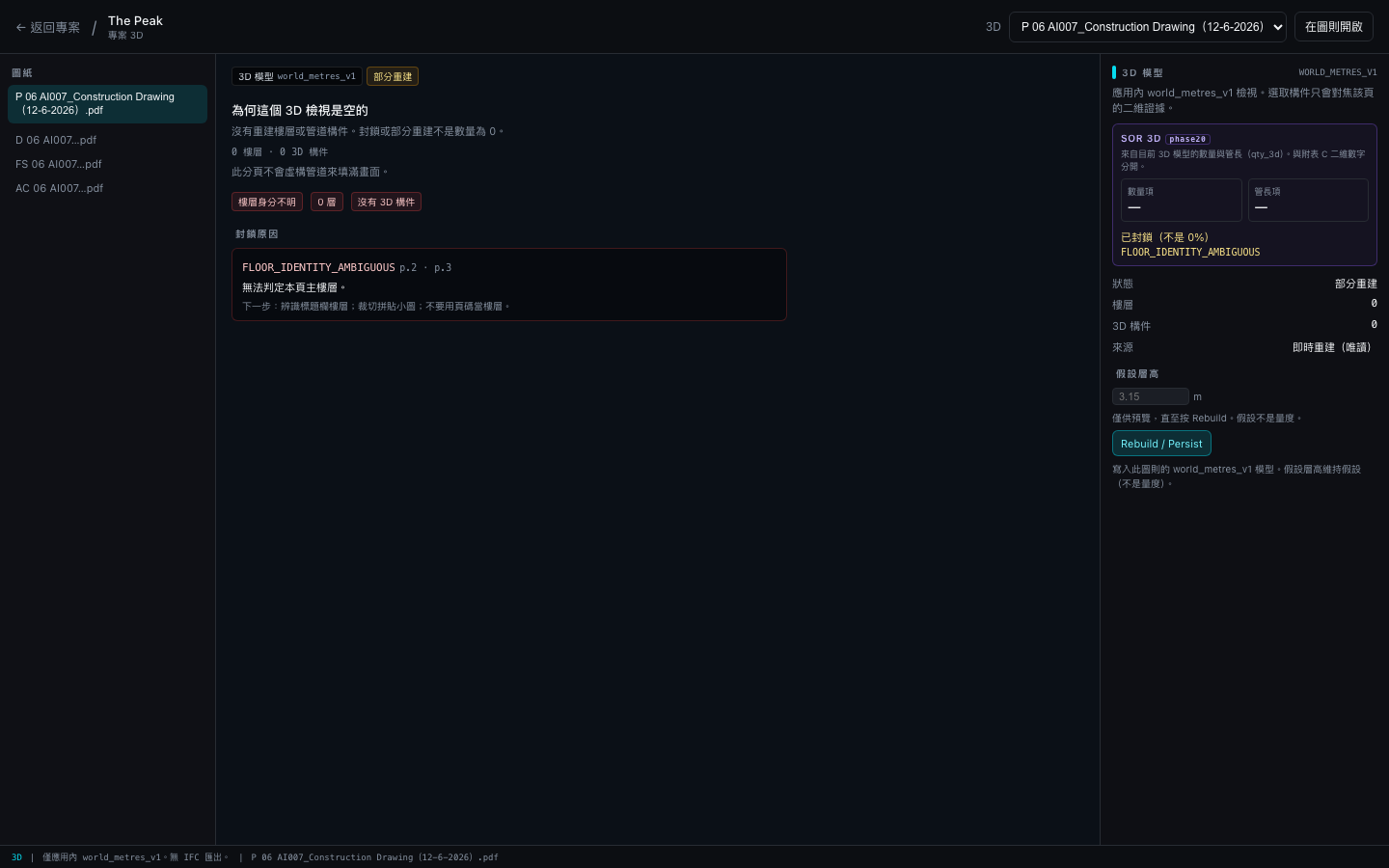
- Project page /projects/[id]/3d with a file picker, Model3dViewer, inspector, and a footer that says in-app world_metres_v1 only — no IFC export.
- Dashboard 3D nav link. Drawing-tab 3D 模型 / 3D model (Phase 18) is unchanged.
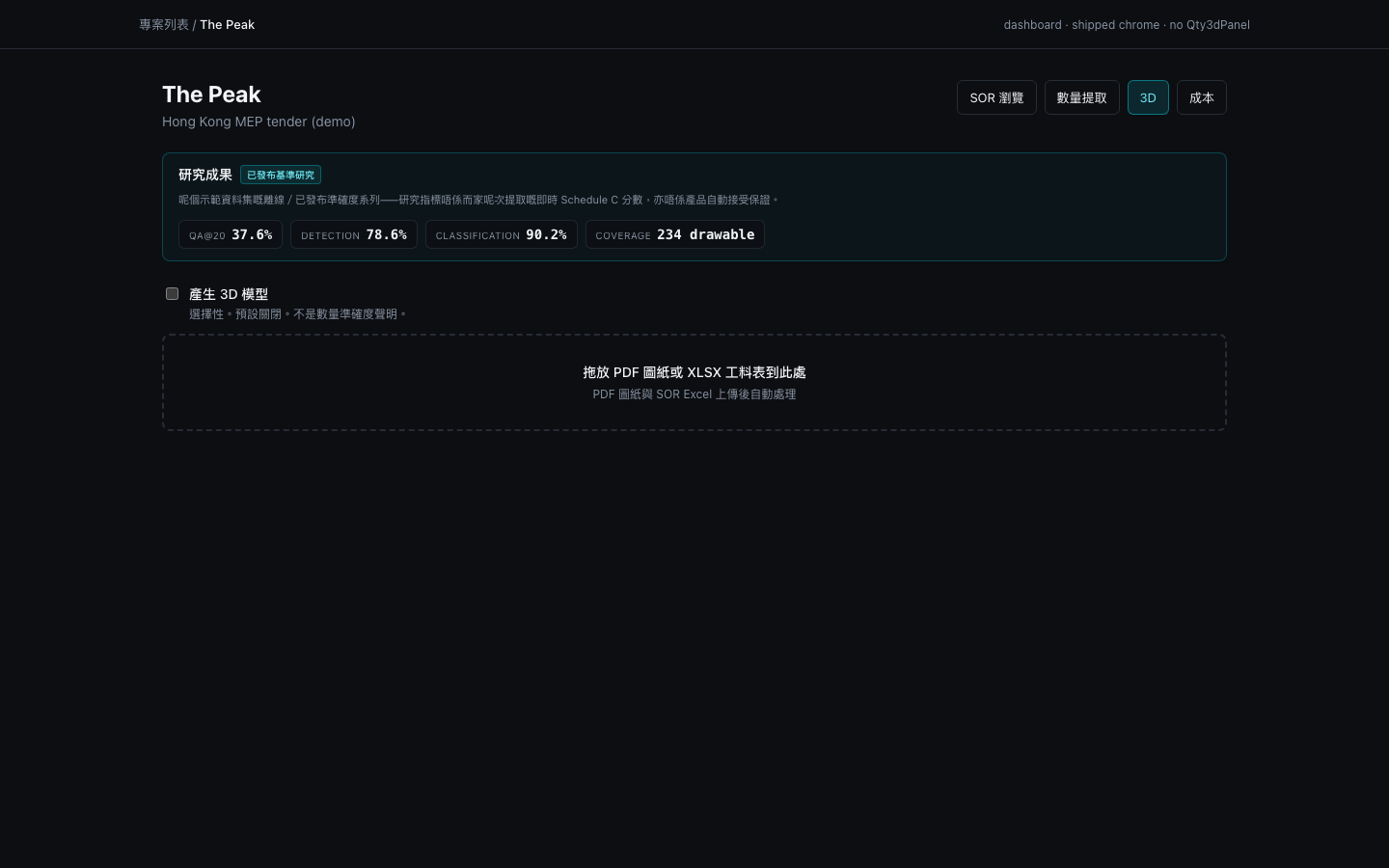
- Qty3dPanel (dashboard Detection / QA@20 / Coverage tiles) was not shipped. There are no qty3d.* strings. Do not read the Peak 研究成果 strip as 3D qty — those tiles are published 2D research (QA@20 37.6%, Detection 78.6%, Classification 90.2%).
Phase 20 S33 is separate
A day later, Phase 20 earned SUCCESS_MODEL_PASS on training_data/澳門大學—S33教職員宿舍建造工程/圖則.pdf: sole-storey G, four printed-label fittings, fabricatedGeometry false, countRows = 11, lengthRows = 0, lengthMetresSum = 0. That model was never persisted to the product database. The signed-in Peak 3D tab does not show those four fittings. See /blog/phase20-first-training-3d-model. Do not import S33’s offline count into a Peak 3D Detection percent.
How to use the shipped 3D surfaces
The rest of this post is a walkthrough of what is on main — not a claim that 3D takeoff is product-default accurate. For upload, extract, legend takeoff, geometric length, Schedule C, and ClaimReview Match on a draft claim, start at /blog/how-to-use-teraquant. Match-to-SOR is a 2D draft-claim path; this post does not attach a ClaimReview to an unearned 3D 80/80 score.
Host: https://www.teraquant.ai. Vertical slice: Peak project 143a3a07-99c1-46b4-809c-716365a673b8, P drawing 198b4105-324b-4ded-8cf8-a267248b19c4. Screenshots below are local captures of shipped chrome on 2026-08-16. They are not a certified production Clerk session. No pipes were painted.
1. Sign in and leave Generate 3D unchecked
Sign in at https://www.teraquant.ai/sign-in. Open The Peak from /projects, or go to /projects/143a3a07-99c1-46b4-809c-716365a673b8. Above the PDF / XLSX dropzone sits Generate 3D model / 產生 3D 模型. It starts unchecked. The helper says the control is optional, default off, PDF-only, and not a quantity-accuracy claim. Spreadsheets are still ingested as SOR. Last-checked is not stored in localStorage.
2. The dashboard has no 3D qty tiles
Under the title row, Peak shows a 研究成果 / Research findings strip. Those numbers are the published 2D series (Phase 1 classification, Phase 12–14 continuity Detection / QA@20). They are labelled 已發布基準研究 / Published benchmark. They are not qty_3d. Immediately below that strip is the upload checkbox — there is no Qty3dPanel with 3D Detection / QA@20 / Coverage. Missing tiles are not 0%.
3. Open /3d
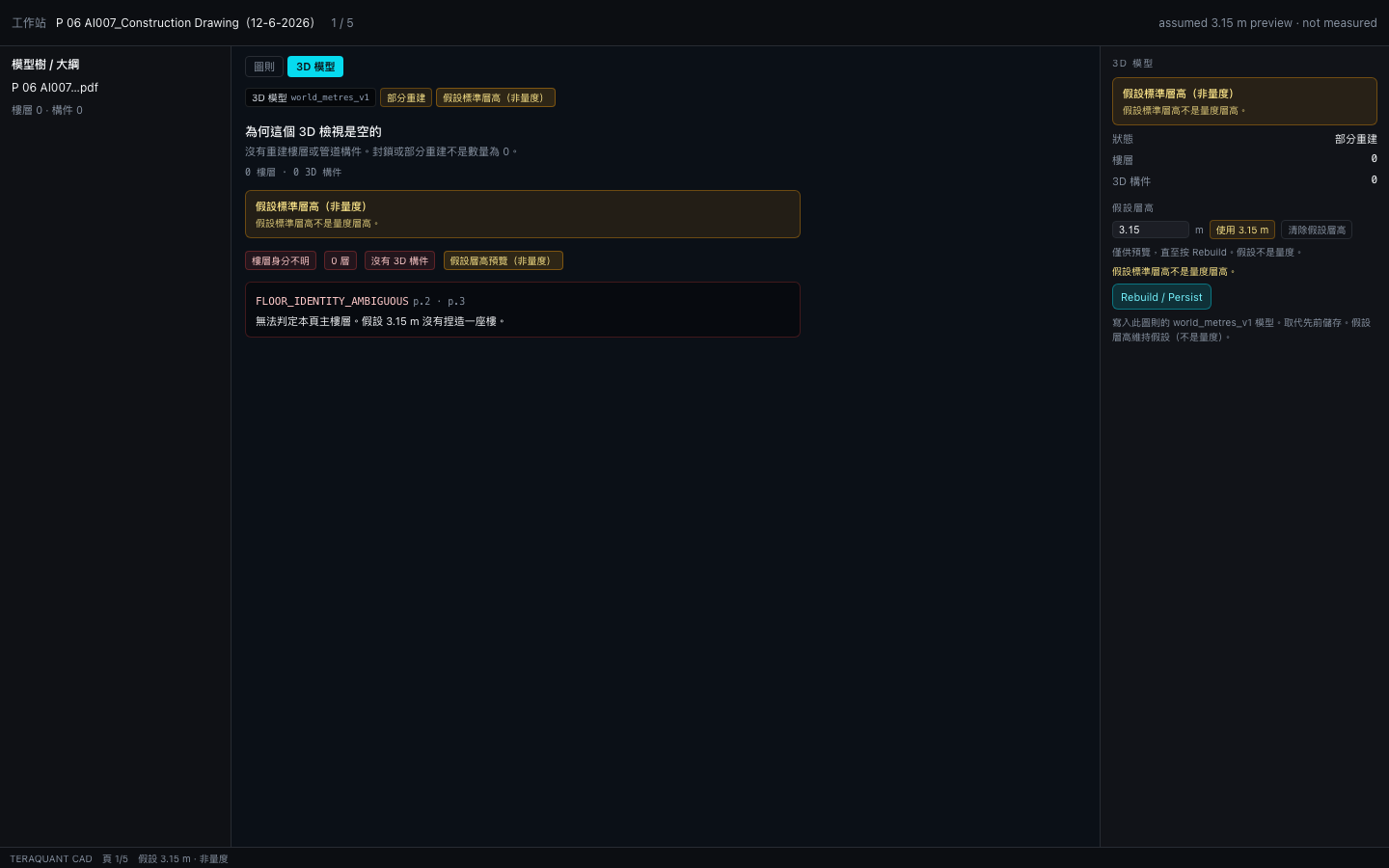
Use the 3D button in the header cluster, or go to /projects/143a3a07-99c1-46b4-809c-716365a673b8/3d. The page is full-width: file list, Model3dViewer, inspector. Pick P 06 AI007_Construction Drawing(12-6-2026).pdf. Peak P still reconstructs as partial: 0 floors, 0 elements, FLOOR_IDENTITY_AMBIGUOUS on pages 2 and 3. The empty-state copy says the tab will not invent pipes. The footer repeats: in-app world_metres_v1 only; no IFC export. Open on drawing jumps to the CAD viewer — it does not fabricate a mesh.
4. The drawing 3D tab is the same empty Peak P
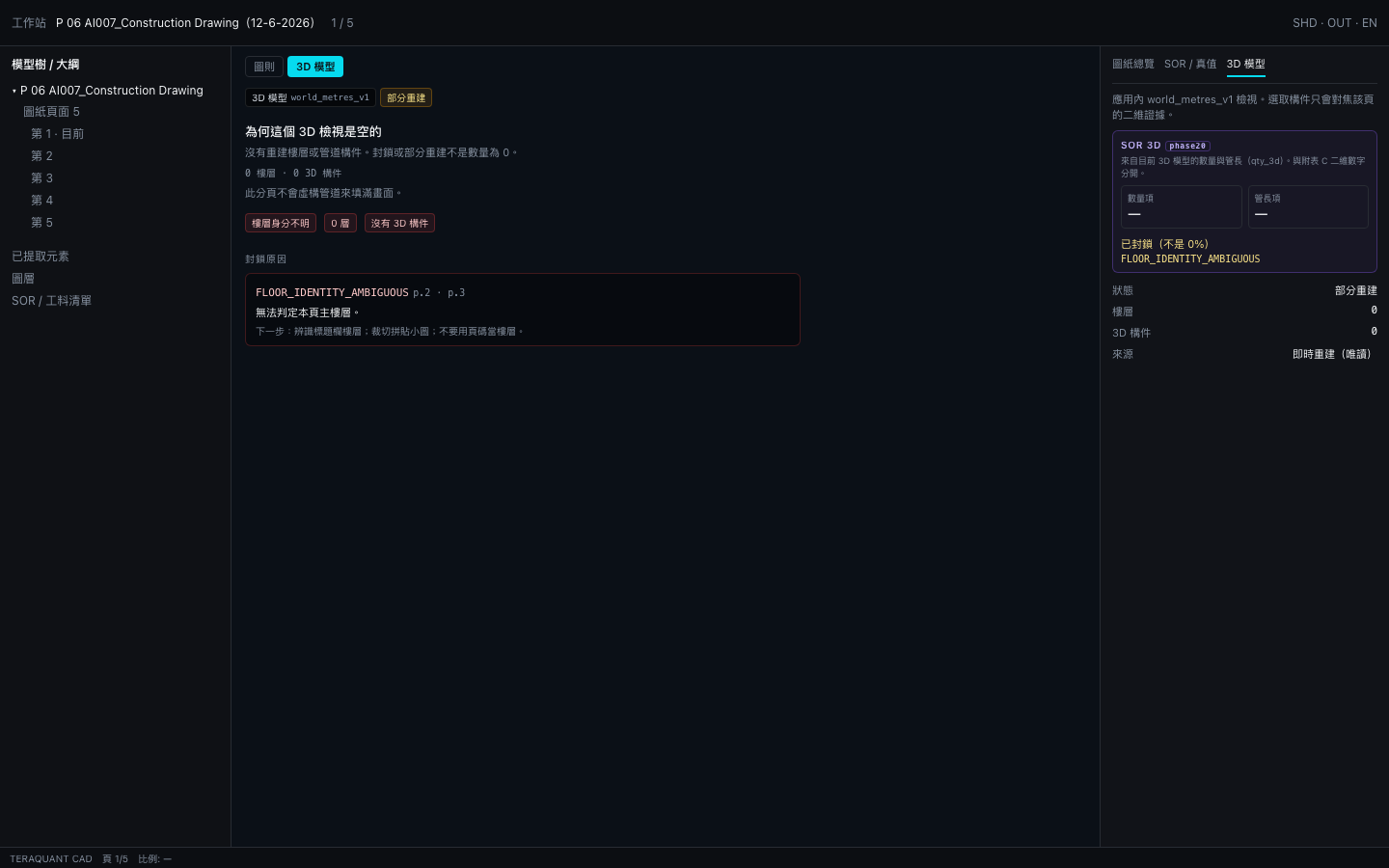
Open the P drawing. Flip the centre canvas from 圖則 / Drawing to 3D 模型 / 3D model, or open the inspector work tab of the same name. You should see the same diagnostics as /3d: partial, 0 floors, FLOOR_IDENTITY_AMBIGUOUS. The Phase 20 SOR 3D strip (qty_3d, not Schedule C) shows dashes and 已封鎖(不是 0%). 圖紙總覽 / Drawing summary stays on 2D extract plus live SOR match.
5. Assumed storey height is labelled assumed
The inspector exposes Assumed storey height / 假設層高 with a numeric field (library default 3.15 m), Use 3.15 m, Clear assumed height, and Rebuild / Persist. Preview-only until Rebuild. After you opt in, both the canvas and the inspector must show 假設標準層高(非量度) / Assumed typical storey height (not measured). On Peak P the floor count stays 0: assumed height does not invent storeys or pipes, and it is excluded from any measured length. Do not call this 量度.
What not to expect
- No Peak P&D 3D Detection / QA@20 ≥80% headline. STATUS is CLAIM_NOT_EARNED.
- No corpus 80–90%. Coverage remains INSUFFICIENT_CROSS_PROJECT_COVERAGE.
- No fabricated pipe tree. If the model is empty, the UI stays empty.
- No IFC, Revit or glTF export.
- Do not blend Phase 17 2D QA@20 (or the Peak 研究成果 37.6%) into a 3D score.
- Do not treat Phase 20 S33 countRows = 11 as Peak 3D Detection.
- ClaimReview Match-to-SOR stays on 2D draft claims (see the field guide). There is no 3D ClaimReview for an unearned 80/80.
What happens next
- Peak P still needs title-block floor identity and cropped montage insets before any 3D Detection percent can exist.
- Do not promote 3D quantity as a product accuracy headline until an MK artefact writes CLAIM_PASS with n/N.
- Phase 20’s S33 model may be persisted only via the opt-in reconstruct path. It does not unblock Peak.
- A later dashboard Qty3dPanel, if shipped, must show — for blocked / not evaluated, never 0%.
Internal stub: docs/PEAK_PHASE19_ACCURACY_REPORT.md. Phase 18 path: /blog/phase18-pdf-to-in-app-3d. Phase 20 S33: /blog/phase20-first-training-3d-model. Field guide (including ClaimReview Match on draft): /blog/how-to-use-teraquant.
Related articles
Phase 20 — First Training 3D Model and a Count/Length Ledger, Without an 80–90% Claim
Phase 20 earned SUCCESS_MODEL_PASS on one University of Macau S33 training PDF: sole-storey G, four printed-label fittings, fabricatedGeometry false. The SOR ledger writes countRows = 11 and lengthMetresSum = 0. That is a count ledger plus an empty measured-length section — not a pipe-length win, not Peak P&D 3D 80/80, and not a corpus 80–90% claim. The signed-in Peak 3D tab is still empty.
15 min readPhase 18 — PDF to In-App 3D to SOR, Without a 3D Accuracy Claim
Phase 18 shipped a PDF → in-app 3D → SOR path. Corpus reconstruct is 0 fully rebuilt, 9 partial, 12 blocked out of 21. Every 3D Detection and QA@20 figure is blocked (null, not 0%). Badge: INSUFFICIENT_CROSS_PROJECT_COVERAGE. No 80–90% claim. This post is the investigation journal plus a signed-in how-to for the 3D model tab — including honest empty / partial screenshots.
18 min read